Motorcycle keyless ignition, Self-cancelling turn signal and Trip Computer User Manual
Keyless Start
Quick Start:
- Sit on the seat or press the starter. Short wake-up beep.
- Authorization via your phone (Bluetooth 4.0, BLE) — about 1 second. Activation melody.
- Turn on ignition by pressing the starter twice.
- Start the engine with the starter button with BRAKE RELEASED.
- Stop the engine by pressing the starter twice with BRAKE PRESSED.
- After 15 seconds, shutdown melody plays and the system goes to sleep.
- No one will be able to start the motorcycle if your phone is not nearby. The distance is adjustable.
How Keyless Access Works in Detail:
Standby Mode
In standby mode, the system is in "sleep" mode, not draining the motorcycle battery.
System Activation
To wake the system from sleep, tilt the motorcycle off the kickstand (sensitivity can be adjusted), for example sit on it or briefly press the starter button. After activation, a short beep will sound, and the system will enter phone search mode or wait for PIN code entry. It will remain in this state for 3 minutes (adjustable). If the phone is not found or PIN is not entered within this time — the system will go back to sleep.
Authorization
1-2 seconds after waking, as soon as your phone connects to the system via Bluetooth 4.0 (BLE) at your desired distance from the motorcycle (adjustable) or a correct PIN code is entered, you'll hear a confirmation melody and the turn signals will start to smoothly "breathe". This means the motorcycle is ready for ignition. The system will wait for your actions for 3 minutes (adjustable). If ignition is not turned on within this time — the system will go back to sleep.
Ignition On
Press the starter button twice in a row. Press clearly and confidently, but don't pause for more than 1 second.
Engine Start
Start the engine as usual by pressing the starter button, but only with the brake released.
While Riding
If the engine stalls while riding, it can be started the standard way — by pressing the starter, but only with the brake released. Also, the system won't allow engaging the starter while the engine is already running.
Phone Signal Loss Warning
While riding, the system tracks the phone's presence, and if the signal is lost (you left your phone behind), after 150 and 400 meters a sound alert will play — a trill of 4 beeps repeated 5 times. You'll have the opportunity to quickly return and get your phone. The engine continues to run, you can reach your destination, and after stopping and turning off — you can start via PIN code.
Engine Stop and Ignition Off
Press the starter button twice with the brake pressed. Press confidently and rhythmically, but don't pause for more than 1 second. After turning off ignition, a countdown begins (15 seconds, adjustable) before going to sleep. Turn signals will start to smoothly "breathe". Before going to sleep, a shutdown melody plays and turn signals fade out smoothly. The final transition to sleep mode is confirmed with a short beep.
Can I still use the old, inconvenient, metal ignition key after installing the system?
You can, just like before. I don't know why you might need this, but you can use your old key as usual.
Smart Self-Cancelling Turn Signals
Smart self cancel turn signals give you real comfort while riding. Keep your focus on the road, not on buttons.
Self cancelling turn signal operation depends on how long the switch was held — 3 flashes with a short click and operation in your selected mode when held longer.
"3 Flashes" Mode (for lane changes)
Activated by a short click of the turn signal switch (press less than 1 second, time is adjustable) in the desired direction. The indicator will flash three times and automatically turn off.
Auto-off for Continuously Engaged Signal
A continuously engaged turn signal can work normally, with auto-off, or in smart mode. The mode is set in settings.
Continuously Engaged Turn Signal Modes
Choose the mode that suits you best in settings:
- Normal — indicator works standard, as long as needed, until you turn it off manually.
- Auto-off — system automatically turns off the indicator after a set time or distance.
- Smart Maneuver-Based Off — system analyzes movement parameters and turns off the indicator after completing the maneuver. You can fine-tune the system behavior to your personal riding style. Read more: Detailed Self-cancelling Turn Signal Algorithm Description
In any of these modes, manually turning off the switch completely stops the turn signal flashing.
Motorcycle Trip Computer
The "My Trips" tab in the app displays details of your last 10 trips, which the app receives from the system via Bluetooth from motorcycle trip computer. The following statistics are available for each trip:
Main Trip Computer Parameters
- • Distance — total kilometers traveled
- • Duration — total travel time
- • Stop time — total idle time
- • Average speed
- • Maximum speed
Dynamic Characteristics
- • Best 0–60 km/h acceleration time
- • Best 0–100 km/h acceleration time
Battery Monitoring
- • Battery voltage at ignition on — assess riding and storage patterns
- • Minimum battery voltage during starting — assess battery wear
- • Maximum battery voltage during trip — shows alternator condition
Motorcycle Computer Diagnostics
Engine Error Handling (Check Engine)
The "Live Data" tab provides diagnostic functions:
- • Read error codes — view diagnostic trouble codes (DTC) from the engine control unit (ECU)
- • Clear errors — clear error memory and turn off the "Check Engine" indicator
Real-time Parameter Display
- • Battery voltage
- • Current speed
- • Engine temperature
- • Engine RPM
- • Throttle position (%)
Engine Overheat Warning
When the engine overheats above 150°C (adjustable), the system will emit a two-tone sound signal repeated 20 times.
Service application for Android - to tune Keyless Start and Self cancel turn signal
About True Keyless App:
The app is NOT needed for daily riding. Phone in pocket is enough. The system works automatically via Bluetooth 4.0 and above (BLE). To start using the app, you need to bind your True Keyless device to your phone. After that, when you launch the app, it will be shown on the login screen where you need to select it. The app will automatically connect to your phone.
System Settings for the motorcycle keyless ignition
System settings:
Settings can only be changed when your motorcycle (True Keyless) is in awakened mode and the app has successfully connected to it.
System settings are grouped in the app into 5 tabs:
- Basic Keyless settings
- General Self-cancelling turn signal control settings
- Speed settings for SMART mode
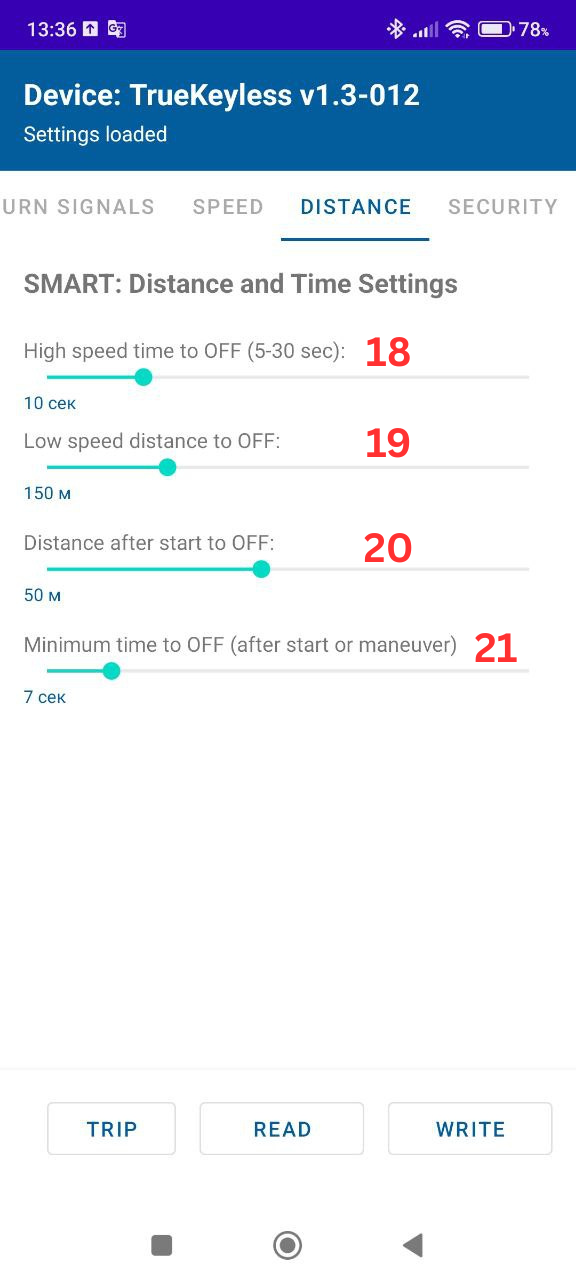
- Distance and time settings for SMART mode
- Security settings
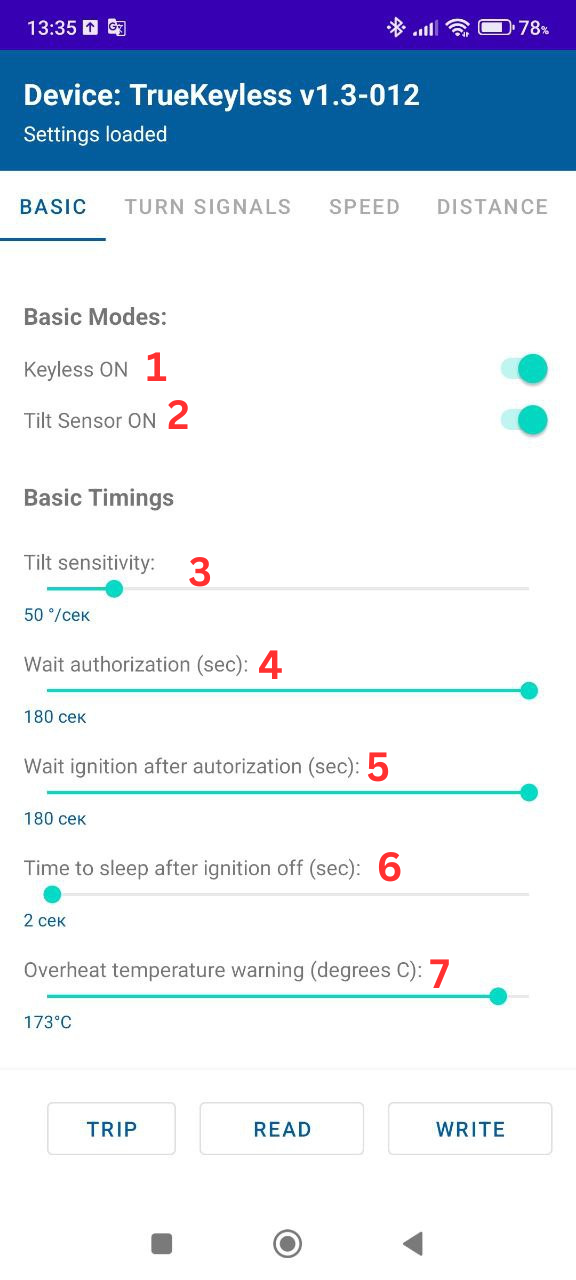
1. Keyless
- • Enable Keyless mode (setting 1). If disabled, the motorcycle will only respond to the ignition key.
- • Allow system to wake up by tilt sensor (2)
- • Tilt sensor sensitivity (3)
- • Authorization wait time (4). If the system doesn't detect a phone or PIN isn't entered within this time, the motorcycle will sleep again.
- • Ignition wait time (5). If ignition isn't turned on within this time after phone detection or code entry, the motorcycle will sleep again.
- • Time until sleep after ignition off (6).
- • Engine overheat temperature for driver warning (7). For air-cooled engines, set it above 140 degrees. Check with your motorcycle manufacturer for details.
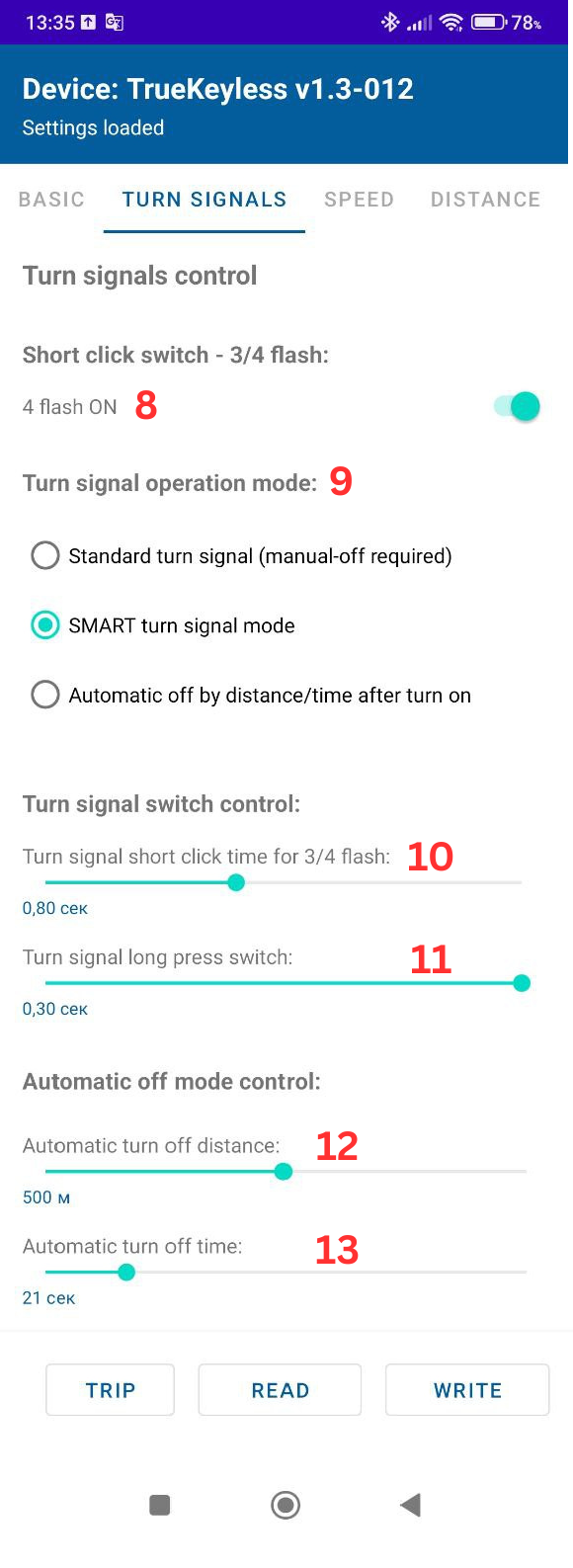
2. Self cancell Turn Signal
- • Select number of flashes (3 or 4) for short turn signal switch click (8)
- • Select number of flashes for short turn signal switch click (9)
- • Select operation mode for constantly engaged turn signal switch (10)
- • Switch click time for "3/4 flashes" mode (11)
- • Auto-off distance (12)
- • Auto-off time (13)
- • Smart off settings - see below
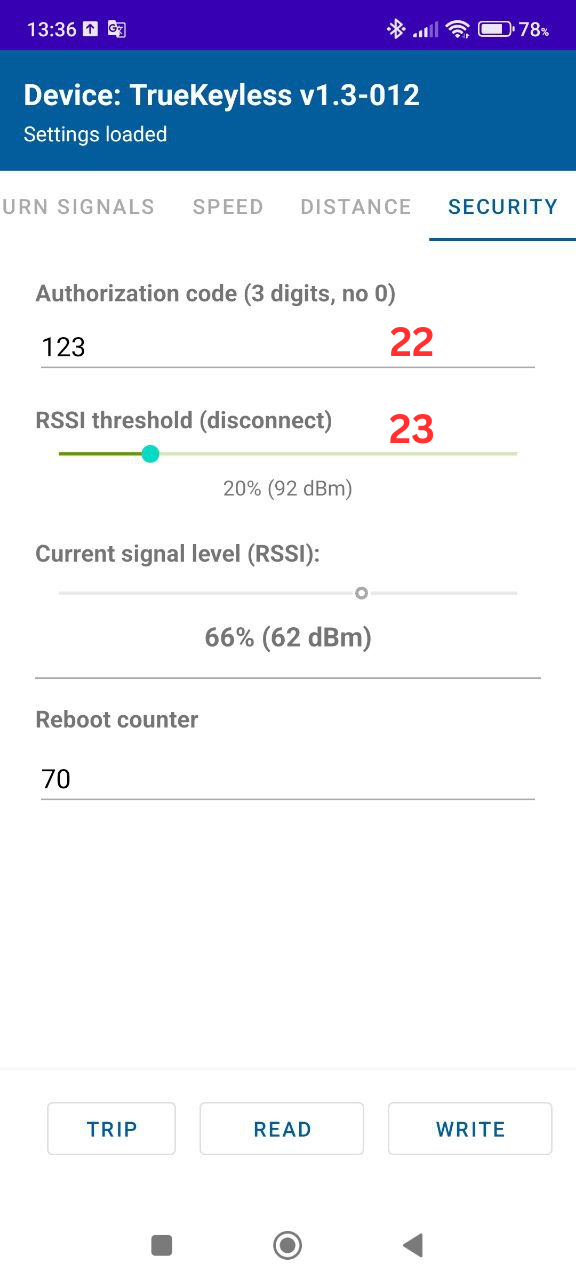
3. Security
- • PIN code value for ignition without phone (22). 3 digits, no digit can be 0.
- • Smartphone detection distance (23). Sit on the motorcycle, check signal level. Set the setting 15-20 percent lower.
Description of settings for SMART mode see below
Self-Cancelling Turn Signal Algorithm Details
Smart Self-cancelling turn signals give you comfort while riding. Keep focus on the road, not on buttons.
Smart Maneuver-Based Algorithm Description
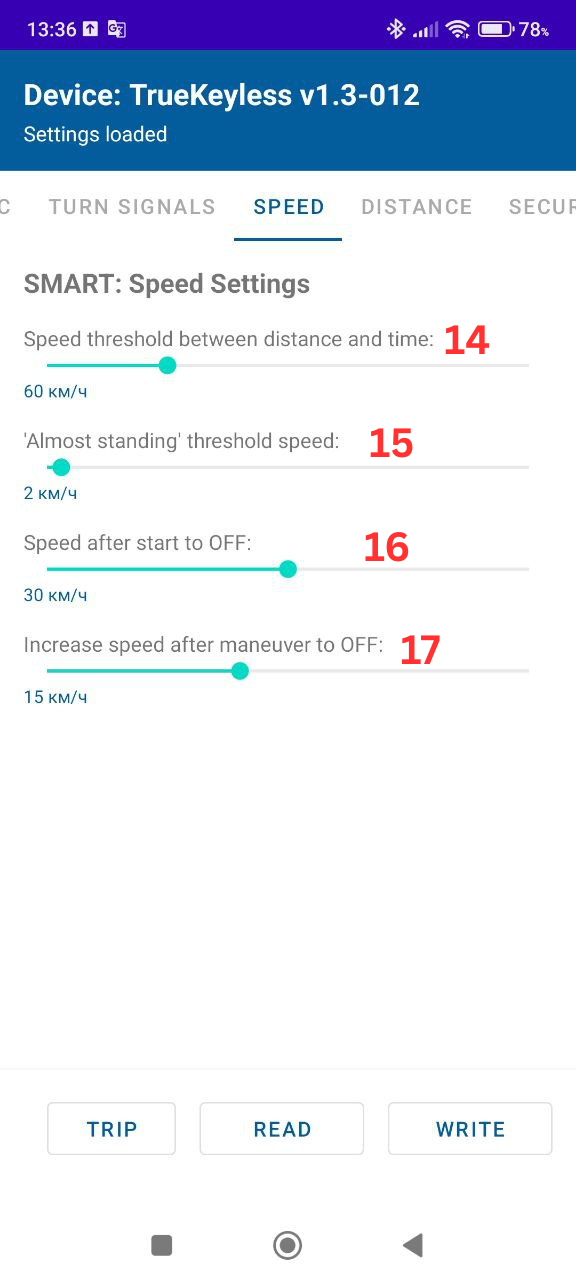
When smart maneuver-based off is enabled, depending on speed at activation time, the system will work according to one of three scenarios (all times and distances can be changed in settings, fine-tuned to your riding style):
1. Starting from Stop
Speed at activation less than 2 km/h (setting 15, in the app screenshot below). Signal flashes for minimum 5 seconds (setting 21), then turns off only when:
- • Reached 30 km/h (setting 16)
- • Traveled 50 meters (setting 20)
2. Lane Change at Speed
Speed at activation above 60 km/h (setting 14) — turns off after 10 seconds (setting 18)
3. Waiting for Turn
Speed at activation below 60 km/h (setting 14), or dropped below 60 km/h (setting 14) while flashing. System analyzes these states in sequence:
- • turns off after 100 meters (setting 19)
- • +15 km/h from minimum speed in turn (setting 17)
- OR
- • 6 seconds of continuous acceleration (setting 21)
- OR
- • 40 meters of continuous acceleration (setting 20)
- • accelerated to 30 km/h (setting 16) after stopping
- OR
- • traveled 50 meters (setting 20) from stop point
SMART Mode Settings
How to Enter PIN Code for Keyless ignition
On first startup after installation or if your phone is not available:
Step 1. Wake the System
Tilt the motorcycle off the kickstand OR briefly press the starter button once. ➔ You'll hear a short "beep". System is active.
Step 2. Start PIN Entry
Press and hold the starter button ~3 seconds until you hear a short melodic signal. Release.
Step 3. Enter Three Digits
Enter three digits (factory default is 1-2-3):
- • Digit 1: Press button quickly 1 time → short "beep" → pause → confirmation melody
- • Digit 2: Press button quickly 2 times → 2 "beeps" → pause → confirmation melody
- • Digit 3: Press button quickly 3 times → 3 "beeps" → pause → confirmation melody
Step 4. Complete Entry
After the last digit, press and hold the starter button for 3 seconds again. ➔ Result: You'll hear a short melodic signal, then a long success melody. Turn signals will start to smoothly "breathe". PIN accepted!
Enter PIN Demo
Watch how to enter default PIN code
Example of entering code 123:
[Wake bike - tilt or press starter] — Short beep
[Hold starter 3 sec] — Short melody
[Press starter 1 time] BEEP — (pause) — Short melody
[Press starter 2 times] BEEP-BEEP — (pause) — Short melody
[Press starter 3 times] BEEP-BEEP-BEEP — (pause) — Short melody
[Hold starter 3 sec] — Short melody — LONG ACTIVATION MELODY
✓ Done, PIN code entered successfully!
How to Pair Your Phone to Keyless start system
Only one phone can be paired to the system. The phone must support Bluetooth 4.0 (BLE). If another phone was previously paired — when adding a new one, the old one is unpaired.
Step 1. Enter PIN Code
Enter the PIN code as shown above. DO NOT turn on ignition.
Step 2. Connect Phone
THIS MUST BE DONE BEFORE TURNING ON IGNITION.
- Open Bluetooth settings on your smartphone
- Enable or refresh search for new devices
- Find device named TrueKeyless-XXXX in the list
- Tap TrueKeyless-XXXX and confirm connection
✓ Done! Phone is the key.
Sit on the motorcycle with phone in pocket — it will unlock automatically.
Sound Signals Reference keyless ignition
| Signal | Meaning |
|---|---|
| High short beep | Button press confirmation during PIN entry |
| Medium single-tone beep | System woke up / system went to sleep |
| Short ascending two-tone signal | PIN digit entered |
| Long ascending melody | Phone found / PIN accepted, system ready |
| Long descending melody | Shutdown, entering sleep mode |
| Repeating trill | Phone connection lost (at 150 and 400m) |
| Two-tone repeated many times | Engine overheating |
| Single descending two-tone signal | Invalid press / wrong PIN code |